
How to Find the Different Emojis – Updated: A Practical Guide

Finding just the right emoji to illustrate a message or post seems simple, but anyone looking for variety online knows that a standard mobile phone keyboard doesn’t always cut it. As encoding standards evolve, hundreds of new emojis are added to systems every year, expanding the options available for social media, apps and documents. Unicode now offers thousands of options categorised into faces, animals, food and symbols, showing that the range goes far beyond basic smartphone icons.
Knowing where to find these new features and how to use them without any hassle helps those who create content, manage profiles or want to make their conversations more engaging. Many people waste time trying to find an image that has gone viral or is part of a recent update, resorting to confusing searches. To solve this, understanding how specialised libraries and navigation shortcuts work makes all the difference.
Where to look for new ideas and practical approaches
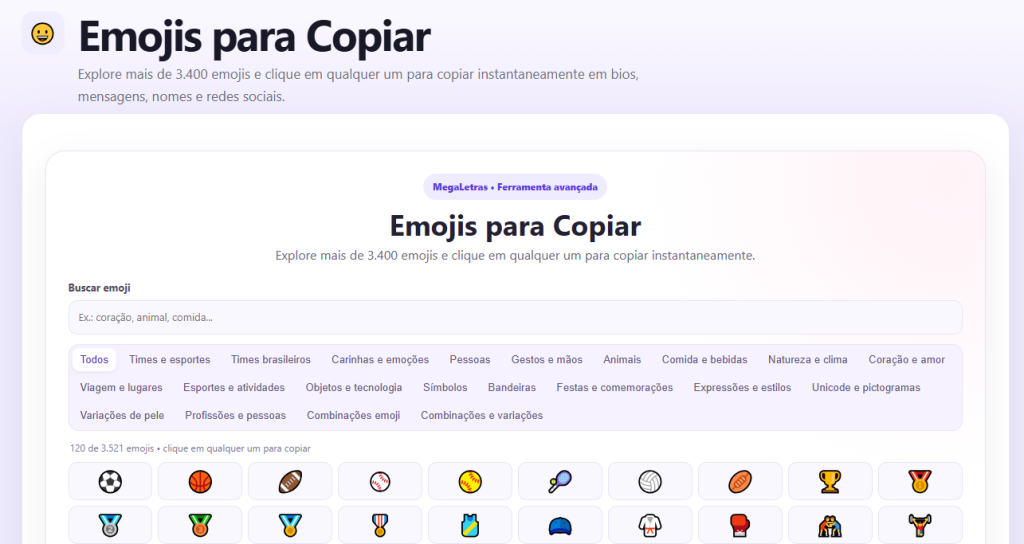
The most straightforward way to expand your visual repertoire is to use our online platforms dedicated to organising Unicode characters. Unlike the limited keyboards found in apps, our website brings together the entire official catalogue released for digital use in one place. Those looking for traditional designs are often surprised by the subcategories available, ranging from skin tones to rare symbols.
Our website acts as a visual dashboard where the icons are organised by theme. Instead of scrolling through endless lists on your mobile, you can quickly browse specific sections. The key advantage is speed: the Emojis can be copied and pasted directly into the text field, whether in an Instagram caption, a WhatsApp message or a document on your computer.
Another key advantage is that these platforms update their libraries as soon as new character sets are approved. This ensures immediate access to the latest additions, allowing users to use the newest characters even before they appear in the device’s automatic updates.
How emojis and their variations work
Behind every yellow smiley or illustrated object lies a universal text encoding standard. What appears on the screen is not a normal image, but a character interpreted by the device. That is why an icon sent from an Android device displays correctly for Windows or iPhone users.
Despite this, the way in which each system displays these characters may vary slightly depending on the manufacturer’s interface. An emoji displayed on an Apple device may look slightly different on a rival system. This aesthetic variation does not alter the character’s function, but it is important for those responsible for ensuring the visual harmony of publications.
The Unicode standard also includes modifiers for gender and skin tone, allowing for dozens of combinations in depictions of people. Being aware of these options helps you choose the most appropriate representation for each context, making communication more inclusive and accurate.
Why copying and pasting emojis has become a common habit
Typing on computers and laptops is often not as convenient as using a mobile phone’s on-screen keyboard. Although Windows and macOS have built-in shortcuts for opening symbol panels, navigating these menus can be time-consuming for those who need to work quickly on long texts or a series of posts.
That’s why websites that let you collect emojis with a single click are so popular amongst marketing professionals, content creators and everyday users. With a browser tab open, simply click on the icon you want to copy it to the clipboard and paste it wherever you need it, cutting out unnecessary clicks and speeding up the formatting process.
Another advantage is finding special symbols that go beyond the basics, such as arrows, geometric shapes, stars and stylised letters. Combining these options makes it easier to create striking visual identities on social media and in online communities.
Tips for using visual elements in a balanced way
Using visual elements requires a balance to ensure the message fulfils its purpose without detracting from the reading experience. When used effectively, these images help to guide the eye, highlight key points and break up the monotony of long passages of text.
Here are a few simple tips to help with content creation:
- Be consistent: Choose images that relate to the subject, whilst avoiding anything too over-the-top that might distract the reader.
- Use as bookmarks: In lists or summaries, placing an icon at the start of a line helps to organise the information and makes it easier to scan quickly.
- Test the preview: What looks good on a large monitor may take up too much space on a smartphone’s narrow screen; check the result before posting.
- Avoid using too many words in the middle of sentences: Replacing too many words with symbols makes the text difficult to understand and disrupts its flow.
These practices ensure that visual elements are used in a natural way, adding value to communication.
The constant evolution of visual standards on the internet
The world of decorative characters is constantly expanding. With new elements regularly being added in response to requests from communities around the world, online catalogues reflect cultural practices and the demands of modern communication.
Keeping up with these new developments helps to make our everyday typing more dynamic and expressive. Whether it’s to personalise a bio, organise a post or send a funny message, having quick reference sources at our fingertips transforms the way we express ourselves in the digital world.

Leave a Reply